~/posts/cicd-with-github-composite-actions
Effortless CI/CD with GitHub Composite Actions

$ tree --contents (12)
GitHub Actions is a powerful and versatile CI/CD solution that works for different teams and projects. It’s a built-in feature of GitHub, the platform that many developers use daily, so it’s easy to set up and use.
One of the benefits of GitHub Actions is that it allows you to write DRY (Don’t Repeat Yourself) code for your pipeline, using reusable steps. Composite actions let you combine multiple run steps into a single reusable action that you can share across repos, organizations or publicly.
🧠 Mental Model for Composite Actions
🧩 As extensions
When you think of composite action you should think of it as an extension of your existing workflow. If certain steps are repeated in multiple workflows, then it makes sense to put them as a composite action.
Note that: composite action is one of the three ways you can create actions that can be shared in public.
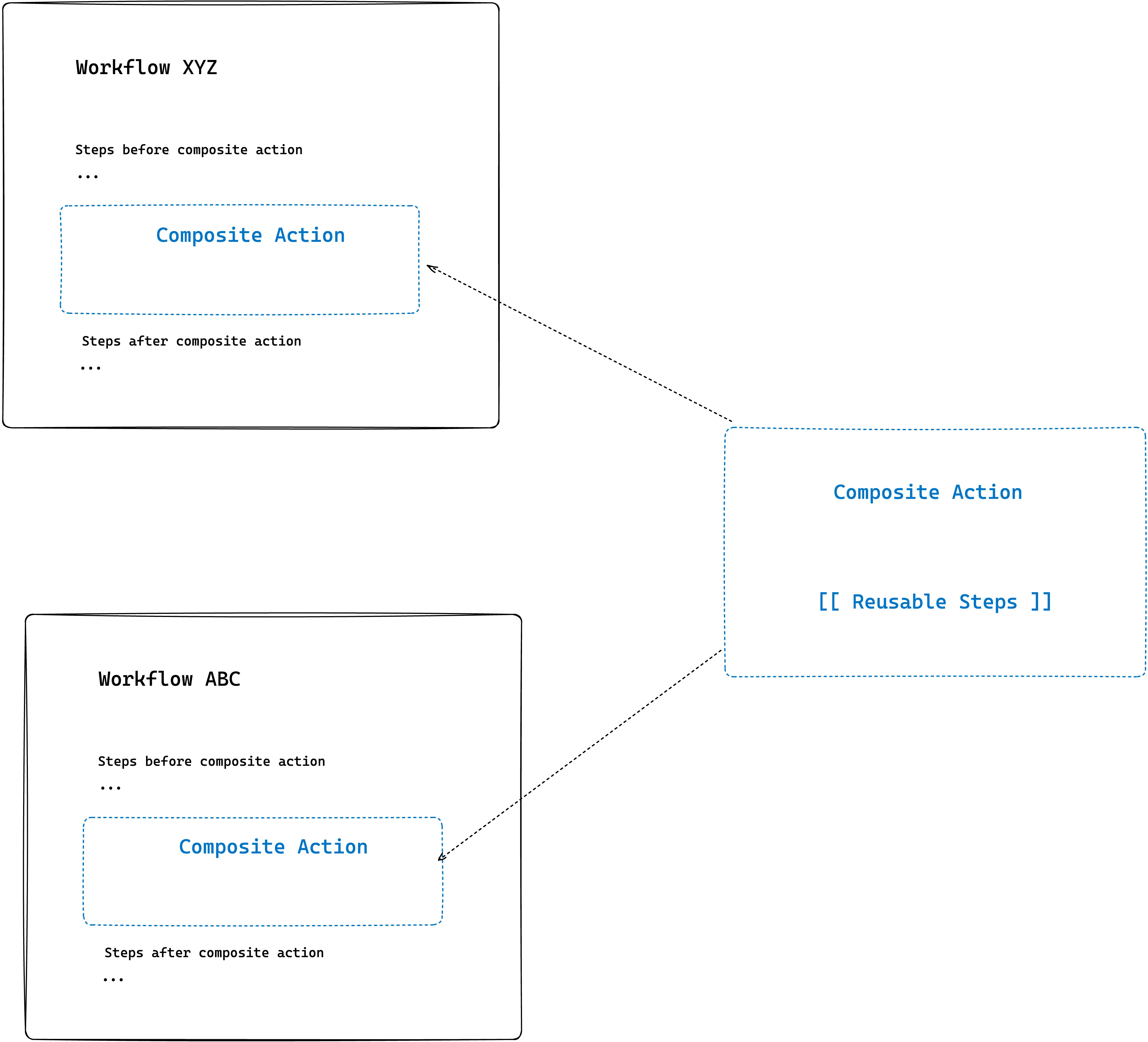
For example, there is a process of building, tagging and uploading a Docker image to the registry for many of your projects, then you can create a composite action that can be referenced in all of your required projects.
🧬 As Functions
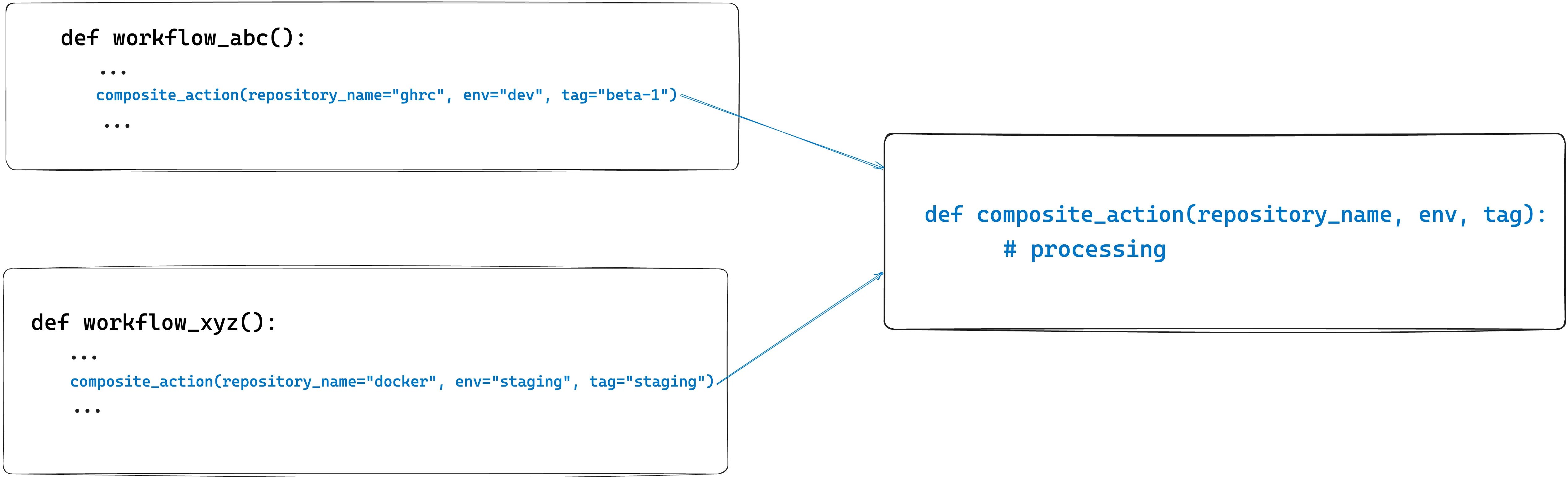
Now as developers, we are pretty familiar with what functions are and how they work. Just for a refresher, you wrap a piece of code as a function when it is supposed to be used in multiple places. You can pass arguments to it which it processes and produces outputs.
Similarly, we can think of Composite Actions as functions to which we can pass arguments, which process and produce certain output.
📚 How to structure your actions?
There are two ways of structuring Composite Actions:
-
Single repo single action (root action)
-
Single repo multi-action (path-based)
Single repo action
This is the most common pattern that you see in publicly shared GitHub Actions. You have a repository that houses action.yaml file on the root which defines a set of steps that can be reused.
Example of a simple hello-world composite action:
name: Greeterdescription: Composite Action to greet someone
inputs:  who-to-greet:    required: false    default: World    description: who to greet
runs:  using: composite  steps:    - name: greet      run: echo "Hello ${{ inputs.who-to-greet }}"      shell: bash
You can browse the above sample action here:
### Single repo multiple actionsIn this pattern, you have a single git repository that houses multiple actions that you can reuse across your organizations. This pattern is mostly popular in organizations where you house multiple composite actions in the same place which is referenced across different projects, teams or domains.
When using this pattern you have to specify exactly where your action is located so the path of the action is a key here.
An example of this pattern is as follows:
You can notice that each composite action has its directory and the workflow file is named `action.yaml` .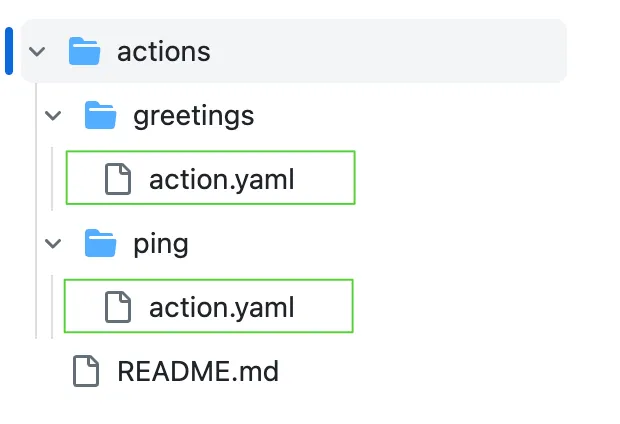
When we name the files action.yaml, we don’t have to mention the file name when calling the action. Meaning we can do this:
uses: yankeexe/actions-combined/actions/ping@mainIf your filename is something different then you have to mention the filename in the calling workflow as well. For example:
uses: yankeexe/actions-combined/actions/ping/ping-action.yaml@main👻 Actions Gotchas
🔎 Is your Action Accessible?
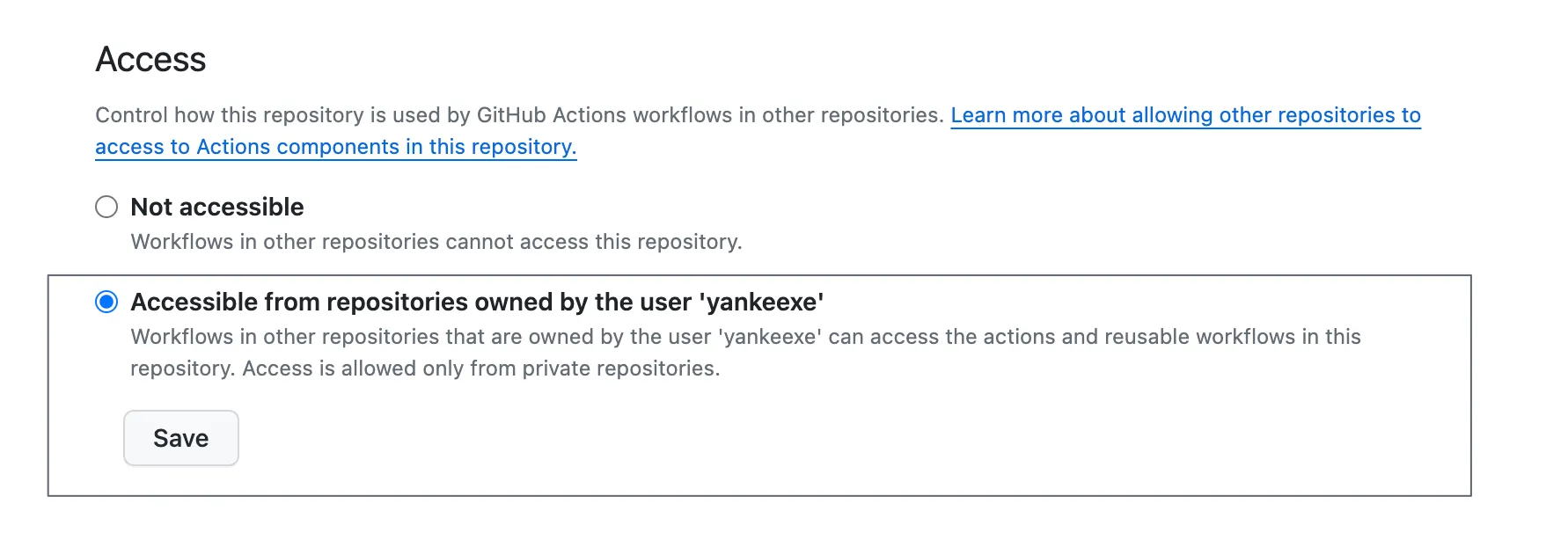
For both single repo actions and single repo multi-actions, we have to note repository visibility. If the composite action is in a public repository then it’s accessible for everyone. If the action is in a private repository then it can be accessed within the organization or users repositories by going to: settings > Actions > General and enabling the following option.
🫵 Referencing your action
You can reference composite actions in multiple ways:
-
🪵 Branch name
Takes the steps from the workflow file present in a branch.
uses: yankeexe/actions-hello-world@main -
#️⃣ Commit hash
Takes the steps from the workflow file present in a particular commit.
uses: yankeexe/actions-hello-world@a37bf8bbc2b75c505b41a0741ce589bf403ed9f9 -
🏷️ Tag
Takes the steps from the workflow file present in a particular tag.
uses: yankeexe/actions-hello-world@0.0.1
🌌 Action Context
The context of the composite action is always set to the repo of the calling workflow if they have checkout action used in them. Otherwise, we can explicitly use the checkout action on the composite action as well.
To use checkout action in the calling workflow it needs the permissions for reading the content of the repository.
# calling workflowpermissions:    contents: read
demo_job:    runs-on: ubuntu-latest    steps:      - uses: actions/checkout@v4      - name: call_composite_action        uses: demo_user/demo_actions/.github/actions/do_something@main        ...
To use the checkout action in the composite action itself, we need the GITHUB_TOKEN passed from the calling workflow to the composite action.
# Calling workflow- name: call_composite_action uses: demo_user/demo_actions/.github/actions/do_something@main with: GITHUB_TOKEN: ${{ secrets.GITHUB_TOKEN }}# composite actioninputs: GITHUB_TOKEN: type: string description: Github token passed from calling workflow required: true
runs: using: composite steps: - uses: actions/checkout@v4 shell: bash with: token: ${{ inputs.GITHUB_TOKEN }} repository: demo_user/demo_project path: main🐚 Each step requires a shell
Whenever we are writing our composite action we’ll likely forget to add the shell key for each of the steps. Shell defines where we want to execute the commands defined in the run field. Possible values for this field are:
-
sh
-
bash
-
pwsh
-
python
-
nodejs
-
cmd
-
powershell
You can read more about the shell field here.
🔐 OIDC in reusable workflow
One of the benefits of composite actions over other reusable workflows is its ability to use OIDC to authenticate with cloud providers without having to store any credentials for it. You can use OIDC with:
-
Amazon Web Services
-
Azure
-
Google Cloud Platform
-
HashiCorp Vault
Example: If your reusable action has some step that involves using AWS resources like S3 to upload an object, then using OIDC you can authenticate with AWS, assume a role you want to use and access the services. This is not possible with workflow_run or workflow_call.
But a gotcha when using OIDC with composite action is that the calling workflow or the main workflow that calls/consumes composite action should have permission set to:
permissions:    id_token: write    contents: read
# Calling workflowdemo_job:  runs-on: ubuntu-latest  steps:    - uses: actions/checkout@v4    - name: call_composite_action      uses: demo_user/demo_actions/.github/actions/do_something@main      with:          role_to_assume: ${{ secrets.AWS_ROLE_TO_ASSUME }}
Then your composite action can have steps as:
inputs:  aws_role_to_assume:    required: true    description: AWS Role ARN to use
runs:  using: composite  steps:    - name: Configure AWS Credentials      uses: aws-actions/configure-aws-credentials@v2      with:        role-to-assume: ${{ inputs.aws_role_to_assume }}
    - name: List S3 buckets      run: aws s3 ls      shell: bash
👋 Conclusion
As we navigate through the ever-evolving landscape of technology, tools like Composite Actions become indispensable and can be a game-changer propelling you toward more streamlined, effective, and enjoyable deployment experiences.
Thank you for reading!
end of post